
Description
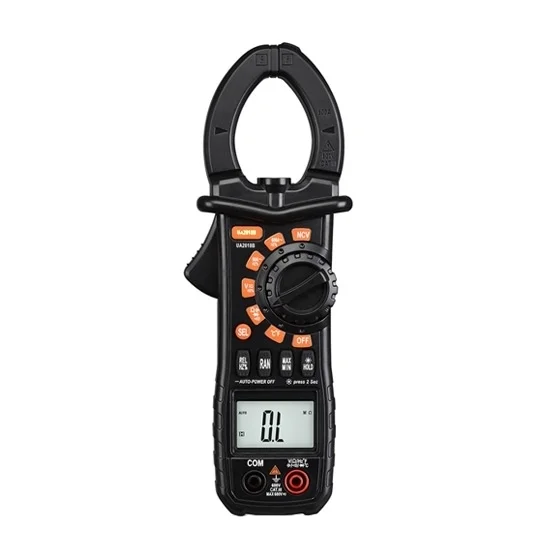
Digital clamp meter has AC current range 0-600A, TRMS/NCV/temperature/capacitance functions, maximum jaw opening size 36mm, 4 digit display and maximum value 5999.
Specification:
| Basics | Model | ATO-UA2018B | |
| Weight | 530g | ||
| Size (L*W*H) | 210*78*35mm | ||
| Display | 4 digit LCD display | ||
| Maximum display value | 5999 | ||
| Power supply | DC 4.5V, 3 AAA batteries | ||
| Maximum jaw opening size | 36mm | ||
| Woring environment | Temperature: 18℃~28℃ (64.4℉~82.4℉), relative humidity:<75% | ||
| Storage temperature | -10℃~+50℃ (14℉~122℉) | ||
| Accessories | A pair of test probes, a pair of temperature probes, a user manual, 3 AAA batteries | ||
| Functions | Item | Range | Accuracy |
| AC current | 600A | ±(3.0%+10 digits) | |
| Inrush current | 600A | ±(5.0%+60 digits) | |
| DC voltage | 600V | ±(0.8%+5 digits) | |
| AC voltage | 600V | ±(1.5%+10 digits) | |
| Resistance | 20MΩ | ±(1.2%+3 digits) | |
| Frequency | 100kHz | ±(3.0%+10 digits) | |
| Capacitance | 100mF | ±(4.0%+3 digits) | |
| Temperature | -40℃~+1000℃ (-40℉~1832℉) | ±(1.0%+3 digits) | |
| Duty ratio | 0.1%~99.9% | ±(3.0%+3 digits) | |
| Special functions | TRMS | True RMS measurement for sine wave signal | |
| NCV | Non-contact voltage test, with buzzer and indicator | ||
| Diode test | Display forward voltage value of diode | ||
| On-off buzzer | Continuity test buzzer | ||
| Data hold | Hold the reading when taking a measurement | ||
| Automatic power off | Automatic power off when 15 minutes no operation | ||
| Overload protection | Overload protection for 100% range | ||
| Range selection | Automatic range selection and manual range selection | ||
| Back light | Back light for LCD display | ||
| Inspection light | Inspection light for clamp operation | ||
| LED torch | A LED torch for night lighting |
Details
Tips: How to measure the temperature by using a clamp meter?
Do not enter a voltage higher than 60V DC or 30V AC in temperature measurement function to avoid human body damage or clamp meter damage.
- Turn the switch to the temperature measurement position and select (press ‘SEL’) Celsius or Fahrenheit as required.
- Connect the negative terminal (black) and the positive terminal (red) of the K type thermocouple to the COM input jack and temperature input jack separately.
- The other end of the thermocouple (test side) close to the surface of the measured object.
- The measured temperature value will be read by the LCD display.
Note: The highest measurement temperature of K-type thermocouple in accessory is 250 ℃ (482℉).
Reviews
There are no reviews yet.