
Description
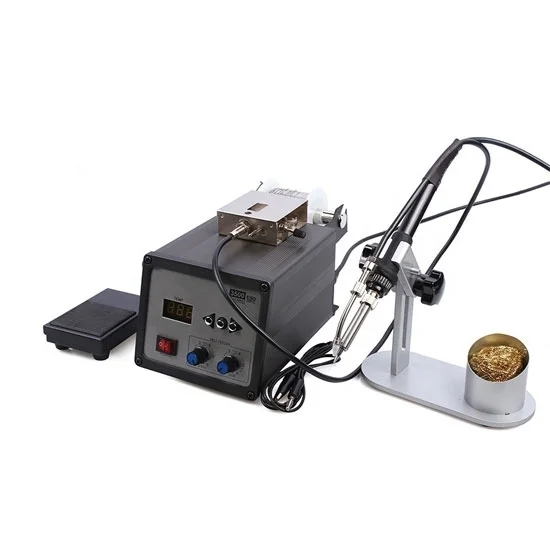
Large digital LCD iron table for sale, adjustable tin speed and time, high temperature resistant cable, safe and secure to use. This 60W digital soldering station is the ultimate tool for all your soldering needs.
Specification:
| Model | ATO-SS-BK3500 |
| Max Power | 120W |
| AC Voltage | 110V/220V |
| Output Frequency | 60Hz/50Hz |
| Temperature Range | 200~500°C |
| Temperatur Stability | ±2°C |
| Tip to Ground Resistance | <2mV |
| Tip to Ground Resistance | <2Ω |
| Tin Speed | ≈14mm/s~35mm/s |
| Tin Output (Automatic Mode) | 0.5~123mm |
| Tinning Time Interval | 0~3.5s |
| Dimensions | 300*310*170mm |
Soldering Station Features
1. High-frequency eddy current heating, fast heating speed, high-quality lead-free soldering, can be equipped with a variety of soldering iron tips, quick and easy to replace.
2. Microcomputer control, large screen display, digital temperature correction.
3. Fully automatic tinning function, tinning speed, tin output, tinning time adjustable, two tin hoses can be configured, easy to use.
4. Two types of feed hose options. Long hoses are suitable for active welding and short hoses are suitable for fixed welding. It can only be used as a lead-free soldering station.
5. A pedal switch or a manual switch can be used. The welding direction can be changed as needed to make the welding more flexible and convenient.
Tips: Manual Welding Procedure
- Prepare for welding. Clean the dirt and grease on the welded components, and then break off the components around the welded components so that the soldering head can touch the solder of the welded components, and burn other components when the soldering head reaches to the welding place. When welding new components, the leads of components should be tinned.
- Heat welding. Touch the soldering tip with a little solder and rosin on the components to be welded for a few seconds. If you want to remove the components on the printing board, wait until the soldering tip is heated, gently pull the components with your hand or silver to see if you can take them off.
- Clean the welding surface. If the welding site solder too much, can be cast off the soldering iron head solder (pay attention to do not burn the skin, also do not throw to the printed circuit board, dip some solder into the end. If the solder spot is too little, not sleek, you can use the soldering tip dip some solder spot welding.
- Check solder joints. See whether the welding spot is round, bright, firm, whether there is the phenomenon of welding with the surrounding components.
Reviews
There are no reviews yet.